Word Counter: Count Words, Characters, Readability, Keywords and Writing Statistics
Knowing how many words are in a document is often only the beginning of the writing process. Depending on what you are creating, you may also need to know the number of characters, sentences, paragraphs, reading time, speaking time, average sentence length, keyword frequency, readability level, and whether your text fits a specific character limit.
The Checker.Free Word Counter is built as a complete writing analysis workspace rather than a simple word-count calculator. It combines live word and character counting with readability formulas, keyword-density analysis, social-media limits, writing goals, document statistics, charts, editing tools, and local draft storage.
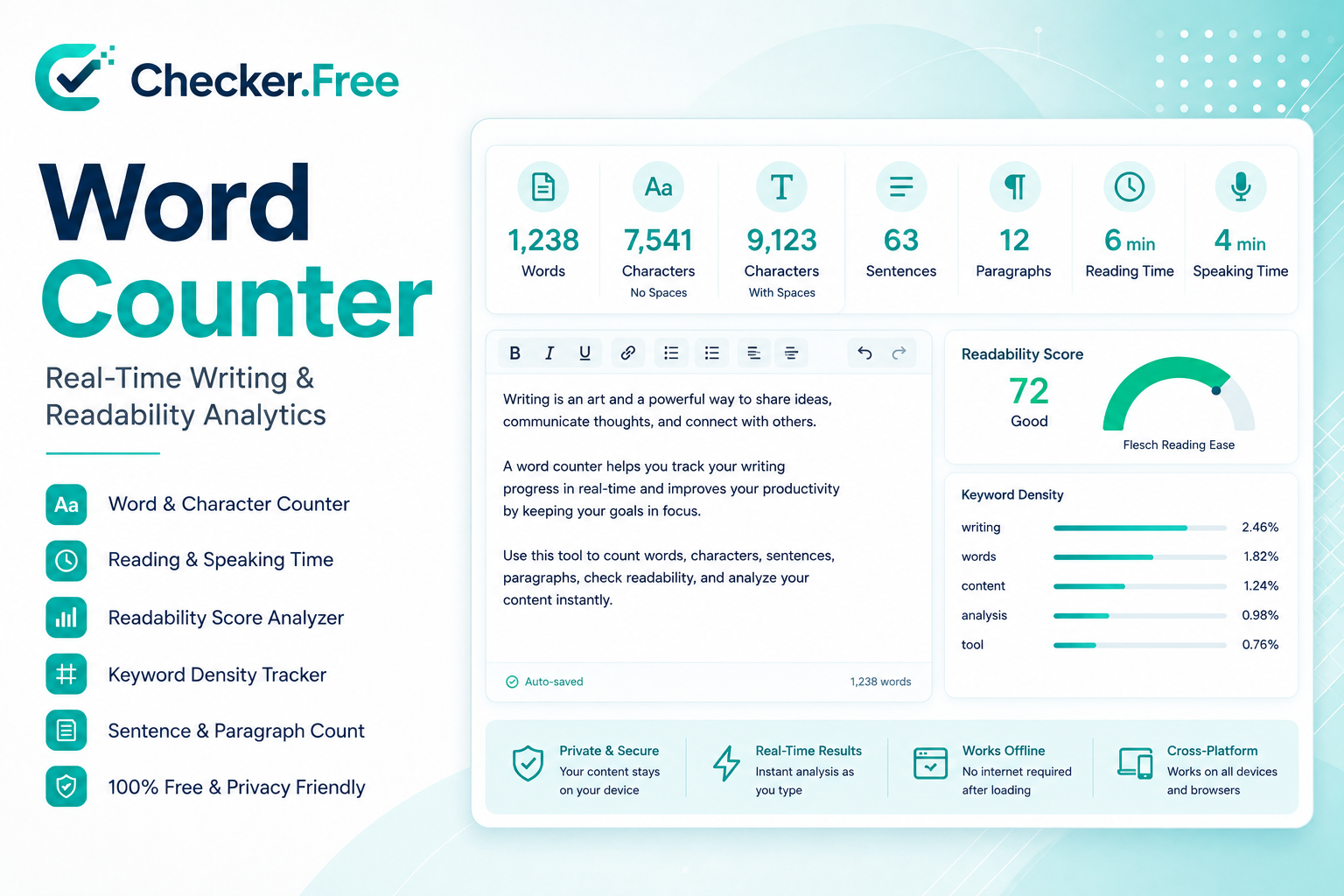
Whether you are writing an academic essay, blog post, social-media caption, speech, landing page, manuscript, or technical document, understanding the structure of your text can make editing much more precise.
What Is an Online Word Counter?
A word counter is a text-analysis utility that calculates the amount and structure of written content.
At the basic level, it answers questions such as:
How many words are in the document?
How many characters does it contain?
How many sentences and paragraphs are there?
A modern writing analyzer can go considerably further.
The Checker.Free tool also examines readability, sentence length, vocabulary diversity, keyword frequency, speaking duration, estimated pages, social character limits, and detailed character composition.
This makes word counting useful for much more than school assignments.
Writers can use it to prepare:
Essays and academic assignments
Blog posts and articles
News and editorial copy
Speech scripts
Presentation notes
Social-media posts
Product descriptions
Advertisements
Website copy
Manuscript chapters
How to Count Words Online
Using the tool is straightforward.
Paste or type your text into the writing area, or upload a supported text file. The statistics then update while you work.
The page supports text files including formats such as:
TXT
MD
CSV
JSON
HTML
PY
CSS
XML
LOG
The writing interface also supports drag-and-drop input, allowing a text file to be dropped directly onto the editor.
After loading the document, the main statistics update automatically.
You can then inspect the writing through several analysis panels, including Overview, Readability, Keywords, Social, Goals, Details, and Charts.
Word Count vs Character Count
One of the easiest mistakes to make is confusing words with characters.
Word Count
Word count measures lexical tokens in the document.
For example:
Checker.Free makes writing analysis easier.
contains several separate words even though the complete sentence is one continuous string of characters.
The tool uses whitespace boundaries and punctuation handling to identify word tokens, including rules for compounds, contractions, and numeric values.
Characters With Spaces
Character count with spaces includes the whitespace used in the text.
This can be useful when a platform or form imposes a character limit.
Characters Without Spaces
Characters without spaces focus on the actual textual symbols while excluding whitespace.
The tool presents both measurements separately, allowing you to see the difference between total text length and pure textual content.
Why Different Word Counters Sometimes Give Different Results
You may paste the same text into Google Docs, Microsoft Word, a website, and another word counter and receive slightly different totals.
That does not necessarily mean one calculator is broken.
Different software can apply different tokenization rules to:
Hyphenated words
Apostrophes
Numbers
Standalone punctuation
Whitespace
Special characters
For example, software may treat a compound expression such as:
state-of-the-art
differently depending on its parsing rules.
The Checker.Free page explicitly notes that cross-software differences can come from variations in tokenization logic.
When working with a strict maximum, it is therefore sensible to use the same counter throughout the editing process rather than switching between several systems.
Reading Time: How Long Does Your Text Take to Read?
Word count becomes much more useful when combined with reading speed.
The Checker.Free Word Counter estimates reading time using a default reading rate of approximately 225 words per minute, while the documentation also presents a broader adult silent-reading reference range of about 200–250 WPM.
For example:
| Word Count | Approx. Reading Time |
|---|---|
| 500 words | ~2–3 minutes |
| 1,000 words | ~4–5 minutes |
| 1,500 words | ~6–8 minutes |
| 2,000 words | ~8–10 minutes |
| 3,000 words | ~12–15 minutes |
Actual reading time varies with vocabulary, subject difficulty, sentence length, formatting, and reader familiarity.
A technical document can take considerably longer to read than a simple conversational article containing the same number of words.
Speaking Time Is Different From Reading Time
People usually speak more slowly than they silently read.
The page uses approximately 120–150 words per minute as a common speaking range for presentations, podcasts, and scripts.
For a five-minute presentation, for example, a script may contain roughly:
600–750 words
depending on the speaker's pace.
This distinction makes the word counter particularly useful for:
YouTube scripts
Podcast scripts
Presentations
Speeches
Voiceovers
Training material
A 1,000-word article and a 1,000-word speech do not have the same time requirements.
Understanding Readability Scores
Word count tells you how much text you wrote.
Readability analysis tells you how difficult that text may be to read.
The Checker.Free Readability panel includes several formulas:
Flesch Reading Ease
Flesch-Kincaid Grade
Gunning Fog
Coleman-Liau
Automated Readability Index
SMOG Index
Average syllables per word
Using multiple formulas is useful because each one evaluates text complexity somewhat differently.
Flesch Reading Ease
Flesch Reading Ease produces a score from 0 to 100.
The page explains that the calculation is based on average sentence length and syllables per word. Higher scores generally represent easier reading, while lower scores indicate more complex prose. A range around 60–70 is presented as a common reference for standard web writing, although the appropriate target depends on the audience and subject.
A technical paper may naturally have a lower score than a simple consumer article.
That does not automatically mean the technical paper is poorly written.
Flesch-Kincaid Grade Level
Flesch-Kincaid converts complexity into an approximate US school-grade level.
For example, a higher grade-level result indicates that the text uses structures or vocabulary associated with a more advanced reading audience.
This can be useful when writing for a specific audience.
Gunning Fog
The Gunning Fog Index focuses heavily on sentence complexity and the proportion of longer, polysyllabic words.
The page describes it as an estimate of the formal education level required to understand the text on first reading.
Coleman-Liau, ARI and SMOG
These additional indices give alternative ways of examining readability.
Because different formulas use different variables and assumptions, looking at several results together can give more context than relying on a single number.
Why Average Sentence Length Matters
A document can contain a moderate number of words but still feel difficult to read if many of those words are concentrated into very long sentences.
The tool tracks Average Sentence Length and also identifies the longest sentence.
Consider the difference between:
The product is designed for people who need a lightweight writing environment that provides live statistics and detailed analytical information while remaining simple enough to use during everyday drafting.
and several shorter sentences expressing the same idea.
The word count may be similar, but the reading experience can be different.
Sentence structure is therefore one of the reasons readability analysis complements simple word counting.
Lexical Diversity: Are You Repeating the Same Words?
The Overview panel also calculates Unique Words and Lexical Diversity.
Lexical diversity helps describe how varied the vocabulary of a document is.
A text containing the same small group of words repeatedly can have much lower lexical variety than a document of the same length using a broader vocabulary.
This can be particularly useful for:
Essays
Long-form articles
Manuscripts
Marketing copy
Educational writing
It should not be treated as a rule that every document must maximize vocabulary variation. Repetition is sometimes intentional and necessary for clarity.
Keyword Density
Keyword density measures how frequently a term appears relative to the total number of words.
The formula used by the page is:
Keyword Density =
(Keyword Frequency ÷ Total Word Count) × 100
The tool can analyze:
1-word phrases
2-word phrases
3-word phrases
It also includes an option to filter common stopwords so the analysis can focus on more meaningful terms.
Why Keyword Density Is Useful
Keyword density is best treated as an analytical signal.
For example, suppose an article repeatedly uses the phrase:
screen resolution
You may discover that the phrase appears far more often than necessary.
That does not mean you should automatically remove it. Instead, the metric can alert you to repetitive language so you can decide whether alternative wording would improve the document.
The page itself describes keyword density as a way to detect overuse rather than a fixed ranking formula.
Word Count Does Not Determine SEO by Itself
A common misconception is that a longer article automatically ranks better.
The page takes a different approach: article length should match the amount of information required to satisfy the search intent.
The tool's documentation emphasizes:
Fulfilling the user's information need
Providing useful topical depth
Maintaining clarity
Organizing the text properly
Avoiding unnecessary filler
A 400-word article can be more useful than a 2,000-word article when the question is simple.
Conversely, a complicated subject may genuinely require thousands of words.
The goal should therefore be appropriate length, not maximum length.
Social Media Character Limits
Words are not always the important measurement on digital platforms.
Many publishing systems are based on character limits.
The Social Limits panel tracks several platform-oriented constraints, including examples for:
| Platform / Use | Reference in the tool |
|---|---|
| Twitter / X standard post | 280 characters |
| Instagram caption | ~125-character truncation point / 2,200 maximum |
| LinkedIn post | 3,000 characters |
| Google meta description snippet | ~155–160 characters |
This makes character counting particularly useful when preparing:
Social posts
Meta descriptions
Promotional copy
Short announcements
Captions
Form submissions
For these use cases, a text can be only a few dozen words while still exceeding the permitted character count.
Writing Goals
The tool includes a Goals panel for tracking custom writing targets.
For example, you can establish a target such as:
500 words
and monitor your progress toward the target.
The interface also provides a character target, with progress bars showing how much of the goal has been completed.
This can be useful for structured writing sessions where you want to reach a specific document size without constantly counting manually.
Detailed Character Analysis
The Details panel goes beyond basic word and character counts.
It can break down the document into categories such as:
Uppercase letters
Lowercase letters
Numbers
Punctuation
Whitespace
Emojis
Lines
Paragraphs
Blank lines
Tabs
URLs
Email addresses
This is particularly useful when the text contains a mixture of ordinary prose, code, links, structured data, or social content.
Charts and Visual Writing Statistics
The Charts panel provides visual representations of writing characteristics.
It includes:
Top word frequencies
Word-length distribution
Sentence-length distribution
A chart can reveal patterns that are harder to notice by reading a number.
For example, a sentence-length distribution can make it obvious that a document contains many unusually long sentences.
A word-frequency chart can expose a term that is appearing much more often than expected.
Built-In Text Editing Tools
The page also functions as a lightweight writing workspace.
The editor includes:
Undo and redo
Find and Replace
Copy
Fullscreen editing
Clear
Uppercase conversion
Lowercase conversion
Title Case
Sentence Case
Trim Spaces
Remove Empty Lines
Sort Lines A–Z
Reverse Lines
Remove Duplicate Lines
This means you can perform much of the cleanup without moving the text into another application.
For example, a document copied from a website may contain unnecessary blank lines or repeated lines. The cleanup tools allow you to normalize the text before analyzing it.
For comparing two separate versions of text, Checker.Free also provides a dedicated Diff Checker.
Uploading Documents
Instead of copying everything manually, you can upload supported text files directly into the editor.
The page supports formats such as:
TXT
MD
CSV
JSON
HTML
PY
HTM
XML
CSS
LOG
The same live statistics can then be applied to the loaded content.
This is useful when analyzing existing drafts, exported text, code files, notes, or structured plain-text documents.
Academic Writing and Essay Word Counts
Students often use word counters to verify assignment requirements.
The useful statistics depend on the assignment.
For an academic essay, the most important metrics may include:
Total words
Paragraph count
Sentence structure
Readability
Average sentence length
Character volume
The tool also notes that students should check the specific syllabus or assignment instructions to determine whether things such as references, footnotes, title pages, and appendices are included in the official word count.
A word counter can tell you the size of your document, but only the assignment instructions determine what officially counts.
Blog Posts and SEO Content
For bloggers and content creators, the combination of metrics can be especially useful.
A practical workflow is:
Draft the article.
Check total word count.
Review average sentence length.
Examine Flesch Reading Ease.
Check keyword frequency.
Look for excessive repetition.
Verify title and meta-description character limits.
Set a target length if needed.
Clean formatting.
Save a revision.
The tool explicitly supports this combination of writing, readability, keywords, social constraints, and goals.
Speeches, Presentations and Scripts
For spoken content, word count becomes a timing tool.
The page uses approximately 120–150 WPM as a reference for speaking time.
For example:
| Script Length | Approx. Speaking Time |
|---|---|
| 300 words | 2–2.5 min |
| 600 words | 4–5 min |
| 750 words | 5–6.25 min |
| 1,000 words | 6.7–8.3 min |
| 1,500 words | 10–12.5 min |
Pauses, audience interaction, slide transitions, dramatic delivery, and speaking style can all increase the actual duration.
Privacy and Local Processing
The page states that its text parsing, syllable calculations, readability analysis, and statistics are performed locally within the browser using client-side JavaScript.
It also describes local browser storage for the active draft, helping protect against accidental refreshes.
That architecture is particularly relevant when working with unpublished drafts, private notes, academic writing, or other text that you may prefer to analyze directly on your device.
A Practical Writing Workflow
The large number of metrics can seem overwhelming at first, so a simple workflow helps.
Step 1: Write the Draft
Start by writing naturally rather than watching every statistic.
Step 2: Check Total Length
Compare the number of words and characters with the requirements of your document.
Step 3: Check Structure
Look at sentence count, paragraph count, average sentence length, and longest sentence.
Step 4: Review Readability
Use Flesch Reading Ease and the other readability indices to identify unusually complex passages.
Step 5: Check Keywords
Use the keyword panel to detect accidental repetition.
Step 6: Clean the Text
Use Find & Replace, Trim Spaces, Strip Blank, or duplicate-line removal.
Step 7: Verify Platform Limits
Check character constraints for the destination platform.
Step 8: Save a Revision
The page supports saving document revisions locally so you can keep milestones of your work.
Common Word-Counting Mistakes
There are several recurring mistakes writers make when checking document length.
Confusing words with characters: A form may request 2,000 characters rather than 2,000 words.
Ignoring assignment rules: Academic documents may have special rules about references, quotations, or appendices.
Adding filler to reach a target: More words do not automatically make content better.
Expecting identical totals everywhere: Different tokenization systems can produce small discrepancies.
The best approach is to treat the counter as a measurement tool and then edit according to the actual purpose of the document.
What Metrics Matter for Different Types of Content?
Different documents need different measurements.
| Content Type | Useful Metrics |
|---|---|
| Academic Essay | Words, paragraphs, readability, sentence length |
| Blog Article | Words, readability, keywords, reading time |
| Speech | Words, speaking time, sentence length |
| Social Post | Characters, line breaks, platform limit |
| Landing Page | Characters, lexical diversity, clarity |
| Manuscript Chapter | Words, page estimate, unique words, vocabulary diversity |
| Technical Documentation | Words, structure, readability, terminology |
The source page similarly organizes content analysis around the type of writing rather than treating one metric as universally important.
Related Checker.Free Tools
The Word Counter becomes even more useful alongside other Checker.Free tools.
Use the Diff Checker to compare different versions of a document and identify changes.
Use the Invisible Character Checker when text appears to contain unexpected spaces, zero-width characters, or other hidden Unicode content.
Use the Image Resolution Checker when preparing images for articles, documents, or publishing projects.
Use the Keyboard Checker when writing-heavy workflows reveal possible keyboard input problems.
Final Thoughts
A word counter is much more useful when it goes beyond simply displaying a number.
The Checker.Free Word Counter combines basic counting with a complete set of writing-analysis functions: words, characters, sentences, paragraphs, unique words, lexical diversity, average word length, sentence length, reading time, speaking time, readability formulas, keyword density, social limits, writing goals, character breakdowns, charts, editing tools, and revision management.
For students, it can help verify assignment length. For bloggers, it can support content editing and keyword analysis. For marketers, it can help manage character limits. For speakers, it can estimate script duration. For authors, it can provide vocabulary and structural statistics.
The key is not to chase a particular number simply because a tool displays it. Word count, readability, keyword density, and other statistics are most useful when they help you understand whether your text is appropriate for its audience and purpose.
Comments
Post a Comment